Select Language

Changelog

A running log of updates, fixes and improvements to eRedaktør. Since we ship continuously, entries are organized by date rather than version numbers.

October 23, 2026 Latest

Smarter coupons and steadier memberships.

  • Coupons can now be limited to the products you choose, picked from a simple multi-product list, and the AI assistant can set this up for you too
  • The membership dashboard gets clear summary cards in the same style as your other dashboards
  • Memberships work smoothly even when two products give access to the same group
  • Visitor statistics are switched on again by default, so you never miss a number
  • The item editor keeps your categories when you reopen the same item

October 22, 2026

Booking reimagined, cinematic scrollytelling and a whole lot more.
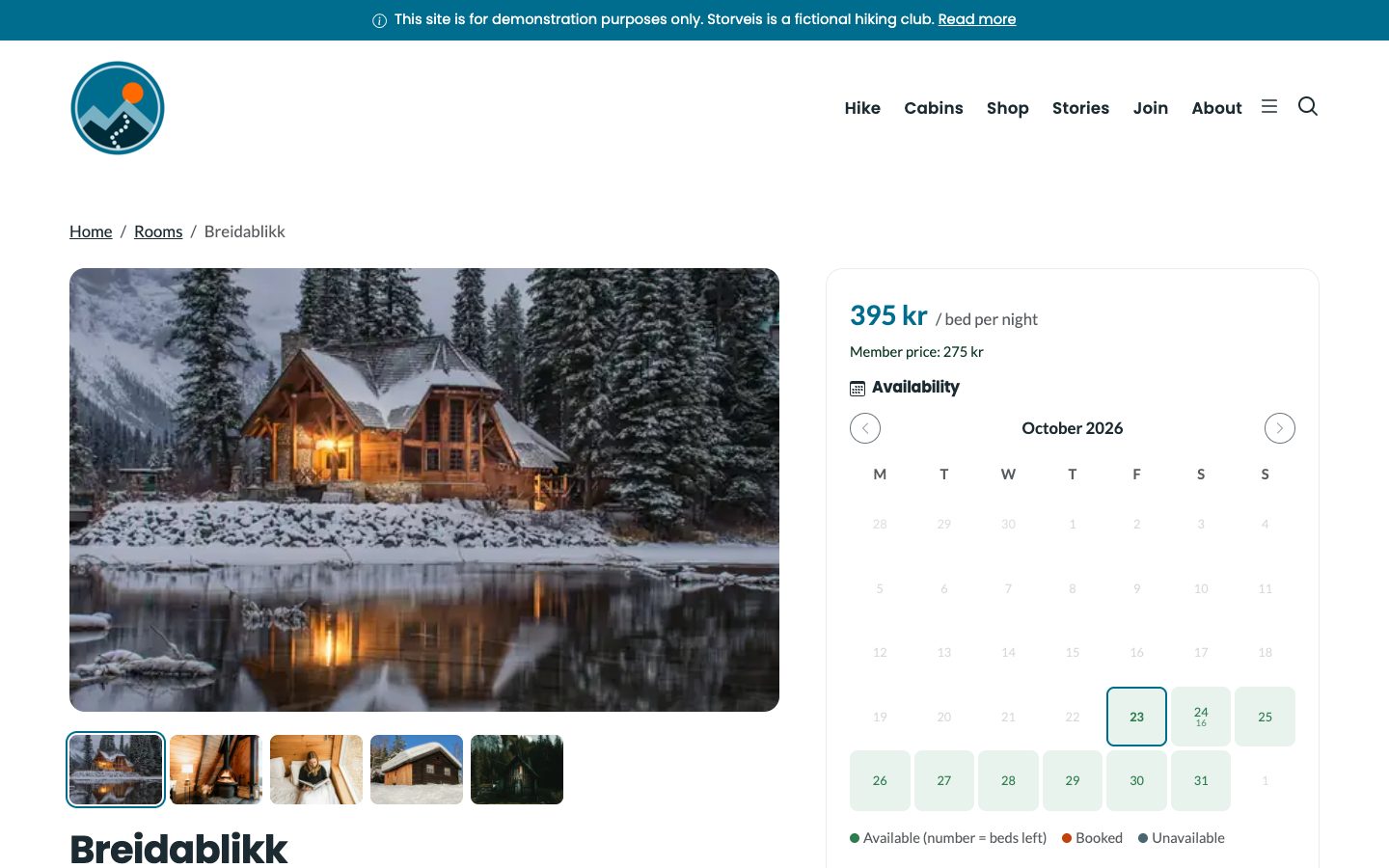
  • Beautiful room pages with a photo gallery, key facts, check-in times and house rules. Rooms and meeting rooms are now edited right in the item editor, and each room's own address is its booking page
  • Fair, clear pricing for stays: rooms priced per bed are calculated as price × beds × nights, beds are counted night by night, checkout days stay free and whole-unit rooms can never be double-booked
  • Show visitors that members pay less, choose the VAT rate for the nightly price, and group prices now only apply to active members
  • Booking pages speak the page's language, Norwegian included, and a new room booking block puts booking anywhere on your site
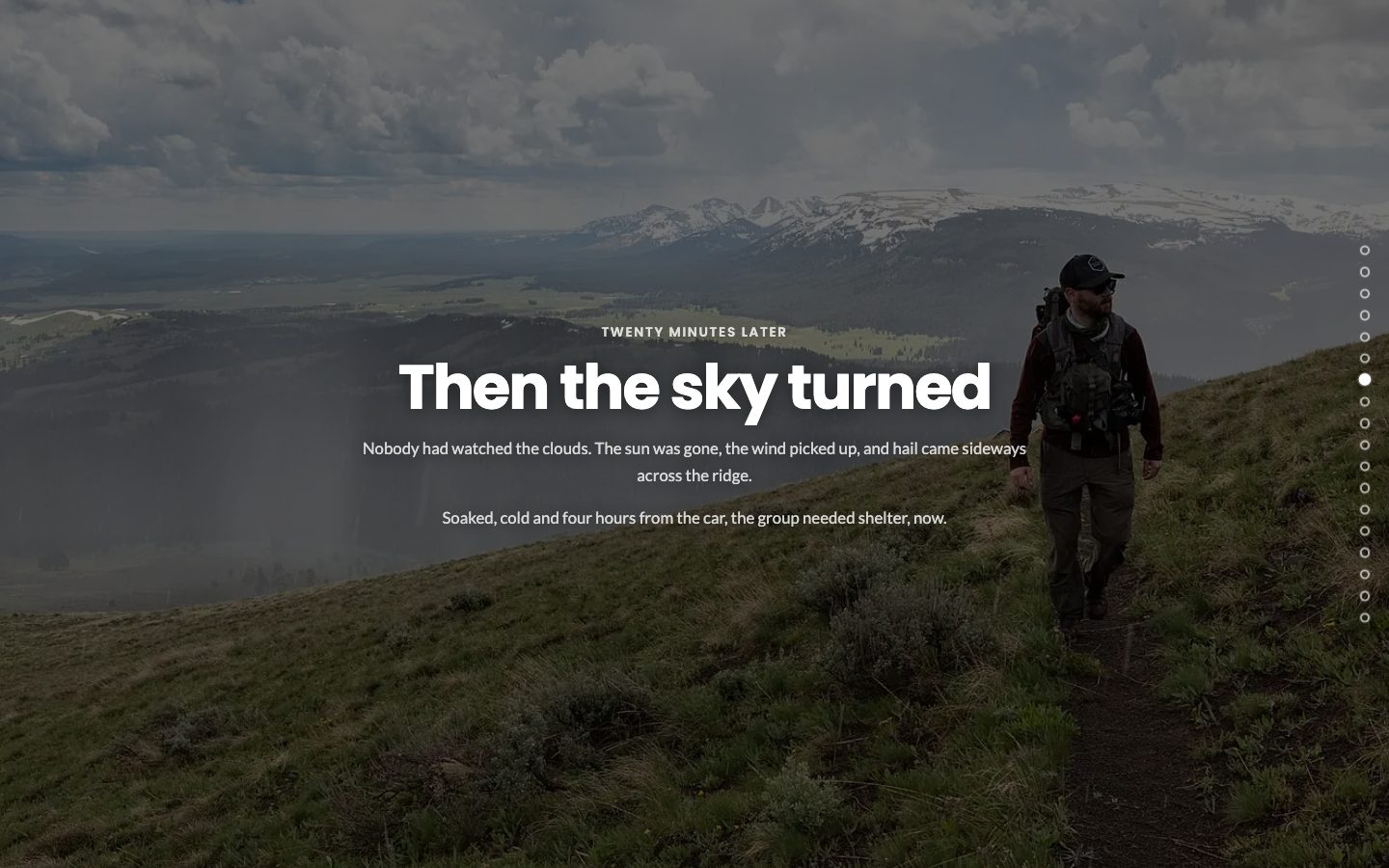
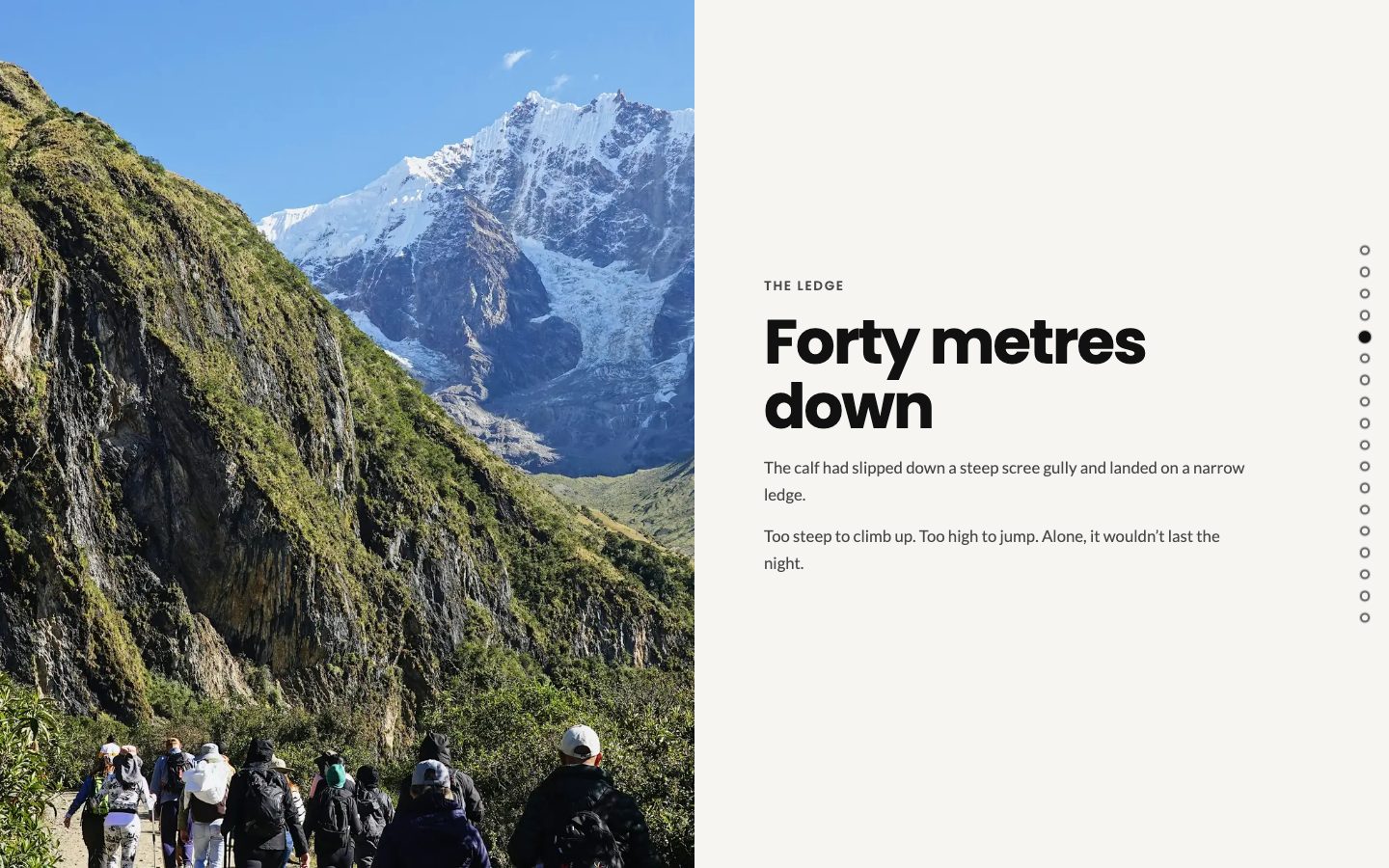
  • Scrollytelling gets cinematic: new scene types (photo, chapter, numbers, quote, cards and split) with fact chips and numbers that count up, a focal point for every image, a reading progress bar and a chapter menu
  • Start a story in seconds with ready-made starter stories: photo essay, trip journal, rescue story and brand story. Edit each scene right on the page
  • Contact change history: see who changed what on a contact, and restore an earlier version with a click
  • A related posts block under every post keeps readers exploring
  • An optional top bar with your own message above the site header, a multi-level side menu with smooth slide animations, and transparent headers that never cover your content
  • Products in item lists now show as shop cards with price and buy button, prices follow your shop currency's format and colour swatches show the real colours
  • Print designs: reorder presets, place a single diagonal watermark, and old previews are cleaned up automatically
  • You are warned if a page address is already used by a built-in page
  • The AI assistant can now manage page and category access rules, VAT rates, bookable rooms with member prices and membership products with signup links
  • Fresh, borderless dashboard tiles with a gentle hover animation
A cabin room page with a large photo, a gallery strip, the price per bed, the member price and an availability calendar
A room page with gallery, member price and live availability, ready to book.
A full-screen scrollytelling photo scene with a headline over a mountain landscape
Full-screen photo scenes that pull readers into the story.
A split scrollytelling scene with a photo on the left and text on the right
The new split scene: picture on one side, story on the other.

October 21, 2026

Print designs that are a joy to personalize, and simpler licenses.

  • Print designs get handy text size buttons, borders in percent, coloured backgrounds and font sizes per preset
  • The picture now stays in view while customers scroll through the options, so they always see what they are creating
  • Licenses have simpler names: Starter, Pro and Enterprise
  • Video thumbnails are saved in an image album, so you can reuse them as images anywhere

October 20, 2026

Print designs that look like a designer made them, and tidy content in a few clicks.
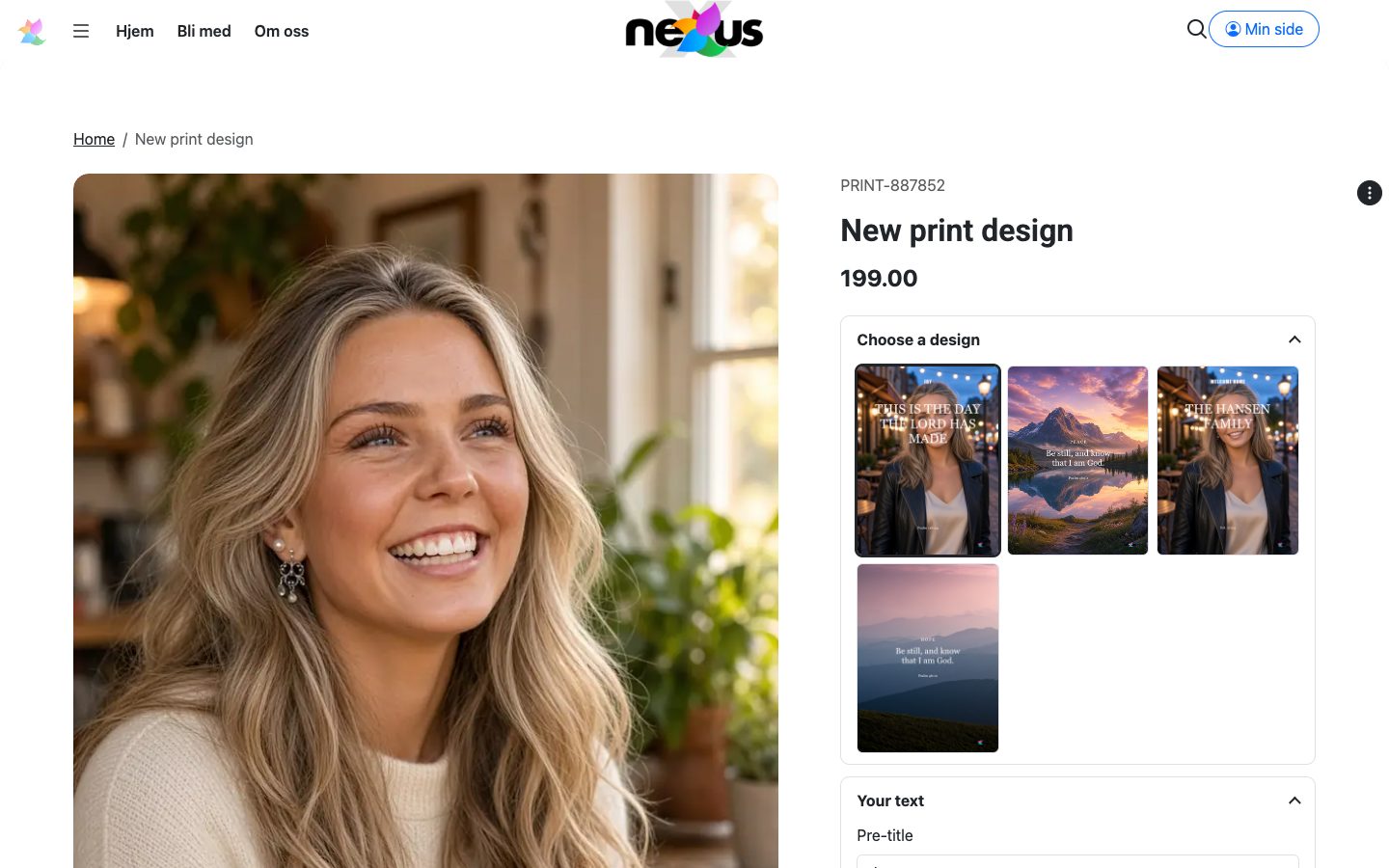
  • Print design presets are now shown as pictures on the product page, so customers can see exactly what they get before they choose
  • Place your logo and text precisely with a passepartout, choose a stacked layout, set text alignment and line height, and add a watermark
  • A new Tags page gives you one place to rename, merge and clean up tags across your site
  • Bulk edit straight from the content health lists: set categories, tags and status on many items at once
  • The AI assistant can now create and apply print design presets for you
  • Settings stack neatly in narrow columns, and licenses and active apps now save reliably for every site
A print design product page with four design presets shown as images
Customers pick a print design by looking at it, not by reading a list.

October 19, 2026

Meet Content health: your site's personal check-up.
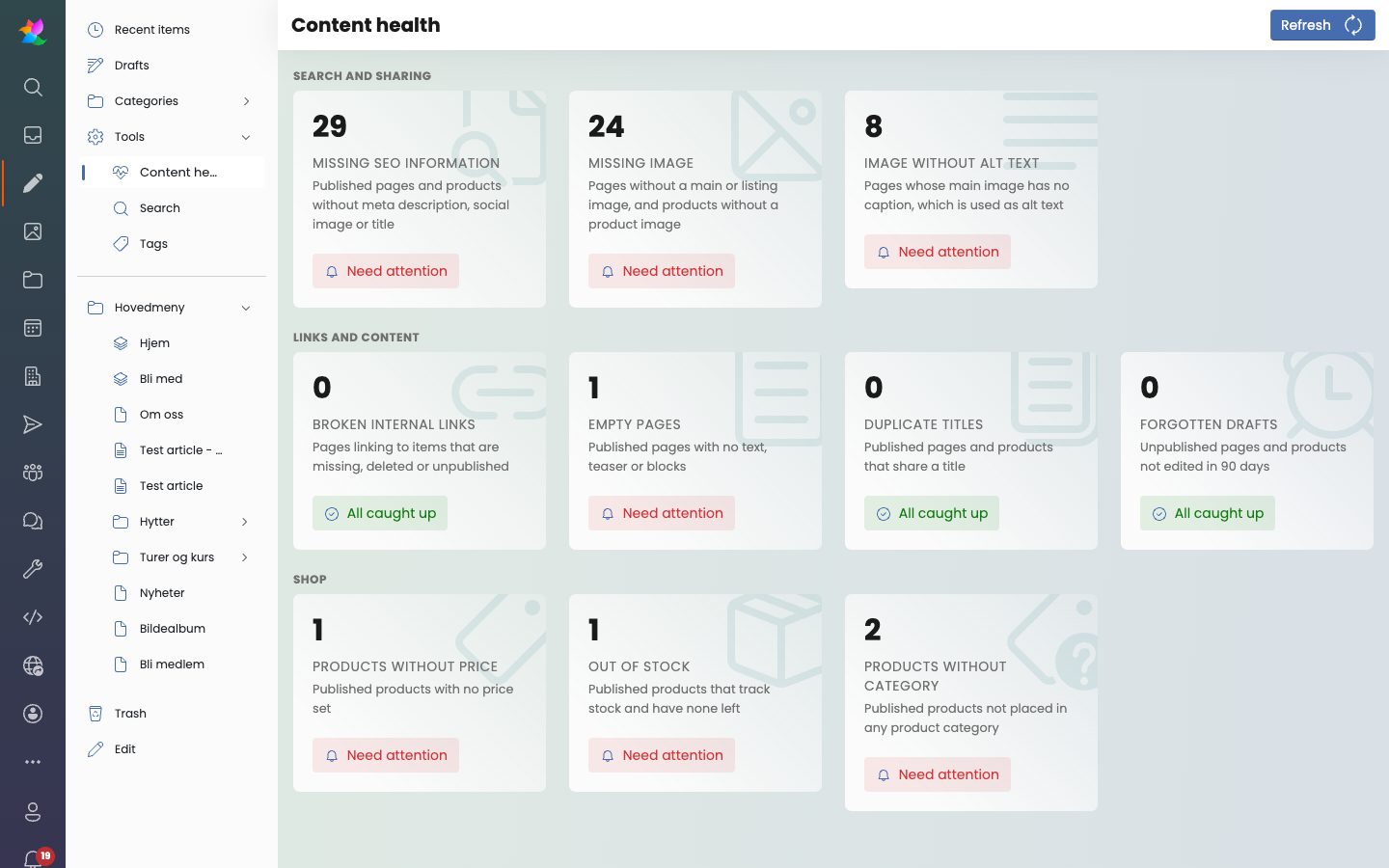
  • The new Content health dashboard finds pages missing SEO details, images without alt text, empty pages, forgotten drafts, products without a price and more, and takes you straight to the fix
  • Item search gets powerful new filters for AI disclosure, status, date range and deleted items
  • The shop dashboard now shows the real number of active orders and lists the newest 50
The Content health dashboard with cards for SEO, images, links and shop issues
Content health shows at a glance what needs attention, and what is all caught up.

October 17, 2026

A leaner, faster foundation.

  • Uploaded images are now resized to a set of standard sizes, so pages load faster and storage stays lean
  • The public website now runs on its own module, a big step towards an even faster and more flexible platform

October 16, 2026

Stronger security, and more control for you.

  • Extra protection for sign-in and against traffic floods, so your site stays up and your accounts stay safe
  • A new switch to turn the member area on or off for your site
  • You can now turn off visitor analytics completely if you prefer
  • Up-to-date libraries, with an unused package removed to keep the platform clean

October 15, 2026

Scrollytelling, effortless onboarding and one login for everything.

  • Meet the new Scrollytelling block: tell your story in full-screen scenes with parallax, scroll animations and a smooth, gentle glide between them
  • Joining a group is now a breeze: enter a code, create an account and land right in your new group
  • One single sign-on for all your sites, so members only need to log in once
  • Members can now log in with their Microsoft account
  • A tidier My groups page, and the login and join pages now greet visitors in your site's default language
  • Crisper, easier-to-read text in dark mode, recent uploads in the video picker and a few small fixes for good measure

October 14, 2026

An app-like member area, group pages and achievements to celebrate.

  • The member area now feels like an app on your phone, with a Today view, a calendar list and push reminders
  • Every group gets its own page with chat, events, posts, resources and members in one place
  • Members can answer Coming or Not coming on events, and leaders can record attendance with a tap
  • A new My achievements page shows badges, points and streaks across all your courses
  • Ticking off a task on the Today card comes with a little celebration, and new badges are highlighted
  • Chat rules let you decide who members can start direct chats with
  • The AI assistant now explains clearly why something could not be done

October 13, 2026

Stay in the loop your way, plus a smarter AI assistant.

  • Choose how you want to be notified about new inbox messages and new orders, with a handy shortcut to your notification settings
  • The AI assistant can now create and edit forms and categories
  • Built-in AI chat follows your rules and settings even more faithfully
  • Order and contact lists now show real totals at a glance
  • Beautifully redesigned language settings cards with sensible default choices
  • Smoother fullscreen feeds, horizontally scrolling button lists and a more readable agreement badge

October 12, 2026

A livelier back office that is a joy to use.

  • Tool and developer pages now come with smooth animations and larger click areas, making them easier to use on any device
  • Save with Ctrl+S / Cmd+S in the item editor, and enjoy a burst of confetti when you hit Save and publish
  • The dashboard animates in gracefully and looks great on mobile too
  • Better SEO and accessibility on your public pages
  • Faster, sharper image previews throughout the back office
  • Footer visibility is now a simple site-wide setting
  • Your session reconnects quietly after your tab has been asleep

October 10, 2026

Flexible layouts with render templates, and faster, safer settings.

  • New render templates let you shape how lists, blocks and pages are displayed, with a handy picker right below your design presets
  • Render template options are fully available in Norwegian
  • Site settings are now kept separate for each site and refresh automatically, so changes show up quickly and reliably

October 8, 2026

Event tickets with QR codes, stronger site security and a simpler setup.

  • Event tickets are reworked: they connect to your calendar and buyers receive a ticket by email with a QR code
  • Sell extras together with tickets and ask buyers questions through a form during checkout
  • Stronger isolation between sites, with sign-in bound to its own site and extra protection for shared accounts
  • Site design changes are now reserved for the developer role, and only developers can give or remove the developer and superadmin roles
  • User import and export is now safe and limited to your own site
  • A new setup checklist replaces the install wizard, and sites that are not live yet are shown behind a friendly holding page
  • Simpler system settings, with clearer explanations of web apps (PWA) and a "Search engines" tab
  • Image galleries support links on images and always show images in the same order as in the editor
  • Delete a whole group of unused files in one go
  • Order lists fill the available space on any screen, and toolbars and tabs now scroll sideways at every width
  • Norwegian translations for order links and developer account messages

October 7, 2026

Group calendars, richer chat and a better member area.

  • Groups get their own calendars, group email and push notifications for chat
  • Chat messages can now have reactions, replies, editing, deleting and pinning
  • Create polls right in the chat, with a handy plus menu in the composer
  • Share files and links in chat, and admins can attach files that are already uploaded
  • Better contrast for your own chat bubbles in dark mode
  • The member area has moved into the back office, with easier mobile navigation and a new profile card
  • Editors can pin important items to the top of item lists
  • A redesigned category editor, with save confirmations for calendar categories
  • A more reliable unused-files scan, and group emails now link back to your site

October 5, 2026

A far better image gallery experience, plus polish all around the editor.

  • Gallery editor reworked: create albums, upload, reorder with drag and drop and manage images in one place
  • Galleries on your public site now hide deleted, unpublished and expired images automatically
  • A compact design picker, shown right in the gallery editor
  • A smarter image crop dialog that refits when you rotate, with clearer feedback
  • The item list gets a breadcrumb and category cards, and the file list is tidier
  • Editor polish: smarter child type choices, a quick new person dialog, working product image sorting and a friendlier creation dialog
  • Dialogs now put the cursor in the first text box right away
  • Better mobile layout for child items, chat and notifications
  • Complete Norwegian translations for all remaining phrases
  • The AI assistant can now edit all Design page settings, layout items and file details like alt text, copyright and credit, and it only shows tools for apps you have turned on

October 4, 2026

A friendlier mobile experience, a smarter image and file library and a personal home for your members.

  • New "My pages" home for members, with a course card showing progress, streak, today's tasks and earned badges
  • The mobile back office gets a floating bottom dock, full-screen apps and search, and tabs that scroll smoothly sideways
  • A redesigned album and folder picker with multi-select cards, checkmarks and easy drill-down, and you are offered an album or folder right after uploading
  • The item list is now mobile friendly and has an optional select mode for editing many items at once
  • A cleaner person icon in the app bar and a tidier "My pages" menu, with log out now one tap away

October 3, 2026

Online courses, a brand new media library and a complete member area.

  • Introducing courses: day-by-day checklists, YouTube and Vimeo videos, leader progress overview and a handy Participants tab
  • Date-based course schedules for each group, with daily task reminders and due dates
  • Folks module with group chat, leader overview and a dashboard with key numbers
  • Join groups with a code, with optional approval, expiry and tools for group leaders
  • A redesigned digital asset library with album cards, breadcrumbs, list view and a built-in manual, which hides system-generated files for a tidier overview
  • New resources area where admins can upload files and members browse folders with search and paging
  • A mobile-first member area with its own app bar entry
  • PDF receipts and order details now include VAT specification and delivery information
  • Schedule templates are easier to read and edit, with a summary header and smooth expand animation
  • The AI assistant can now work with group access, group chat and courses

October 2, 2026

Personalized print products, smarter shop automation and polished podcasts.

  • Print designs get their own page with styles, sizes with prices, passepartout, three text fields and a printery-ready PDF, plus customer choices at checkout
  • Better font handling for print designs, including weight, italic and your own uploaded fonts
  • Invoices now follow Norwegian invoice rules and include payment details, and are sent through the outbox
  • New shop options for delivery, default currency, filters and overdue payment reminders
  • Product reviews are quicker to submit, moderated and shown with search-engine rating markup
  • Easier automation with simpler rule setup, test sending and a low-stock alert digest
  • Podcasts get a more reliable RSS feed, replaceable audio and artwork shown on every episode
  • The inbox gets a trash for deleted form responses and smoother reply and status handling
  • A refreshed dashboard with a top tasks card, recent work and clear key number cards
  • The user profile gains a Security tab and clearer save feedback
  • Button lists now count clicks

October 1, 2026

Built for mobile, sharper dashboards and a stronger, safer platform.

  • The back office now works beautifully on your phone, with a new top bar, a slide-out section menu and toolbars that fit small screens
  • A brand new app launcher and a redesigned app store make it easy to find, compare and add the apps you need
  • Fresh, calmer dashboards for shop, booking, meeting rooms, CRM and people, with clearer key numbers at a glance
  • CRM appointments are easier to plan, with week and month views, quick-pick titles and a required contact
  • Tasks now have a backlog, sprints and a board, with a clear difference between who is assigned and which contact it concerns
  • Chat is faster to use: press Enter to send and see conversations update live
  • The inbox is now mobile friendly, showing folders first and a simple back button
  • Newsletters are more dependable, with no lost edits, a full subscriber list and a proper send and schedule dialog
  • Guests can pick their booking dates straight from the room page calendar
  • Files and images get working search, easier uploads and friendlier empty states
  • Schedules now follow their event automatically when it is rescheduled
  • Public pages load even faster, with lighter pages and optional static rendering for simple content
  • Extra security hardening across payments, file access, sign-in and the AI assistant connection, plus safer user, role and group management
  • New AI assistant tools for tasks, sprints and chat
Monthly summaries

Before October we summarize each month as a story: the highlights, why they matter, and what they look like.

Monthly summary

September 2026

The month your website got an AI co-pilot. September was all about letting you, your team and your AI assistant build better pages, faster, and with full control.

Connect your AI assistant in minutes

eRedaktør now speaks the language of modern AI assistants like Claude, Copilot and Cursor. A new AI / MCP area walks you through connecting one, with named API keys that only open the doors you choose, a ready-made setup prompt and a hardened sign-in flow. Once connected, your assistant can work on newsletters, CRM, people and groups, banner images, item lists, calendar images and even your site-wide CSS, with automatic backup and restore. Every action is logged, and the activity log has filters so you can see exactly who did what.
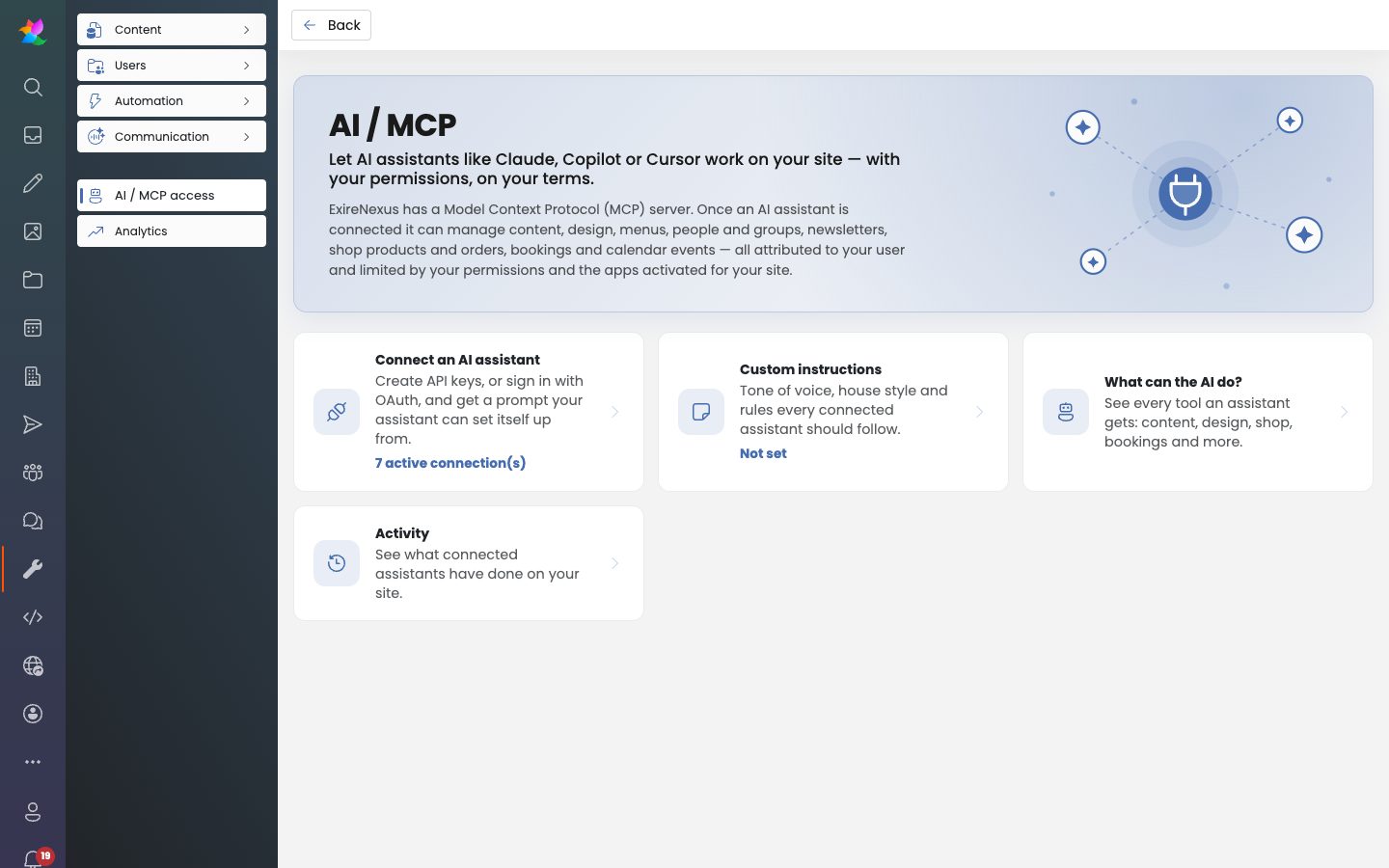
The AI / MCP page with cards for connecting an assistant, custom instructions, capabilities and activity
One place to connect, instruct and keep an eye on your AI assistant.

We also take transparency seriously: content can now carry an AI disclosure level (in line with the EU AI Act), shown with a small AI icon in the editor.

Edit right on the page
  • Live edit mode: click a paragraph or HTML block on your actual page and change it on the spot
  • Version history: every change can be reviewed and reverted, so nothing is ever lost
  • Design presets: save a look once and reuse it on any page or block for a consistent brand
  • A tabbed media picker, custom fonts, a tag picker, image bleed and custom media animations
  • A language selector in the editor, plus default image position and size for new paragraphs
Faster pages for every visitor

New smart caching makes pages load noticeably faster, and every page and block now comes with built-in CSS classes, so styling can be tailored without extra work on your side.

A calendar you can trust

Recurring events grew up: change or delete a single occurrence without touching the rest of the series. All events are stored in one time standard and shown in each visitor's local time, so no more timezone mix-ups. Drag and drop is back, and event scheduling with a person picker makes it easy to plan who does what.
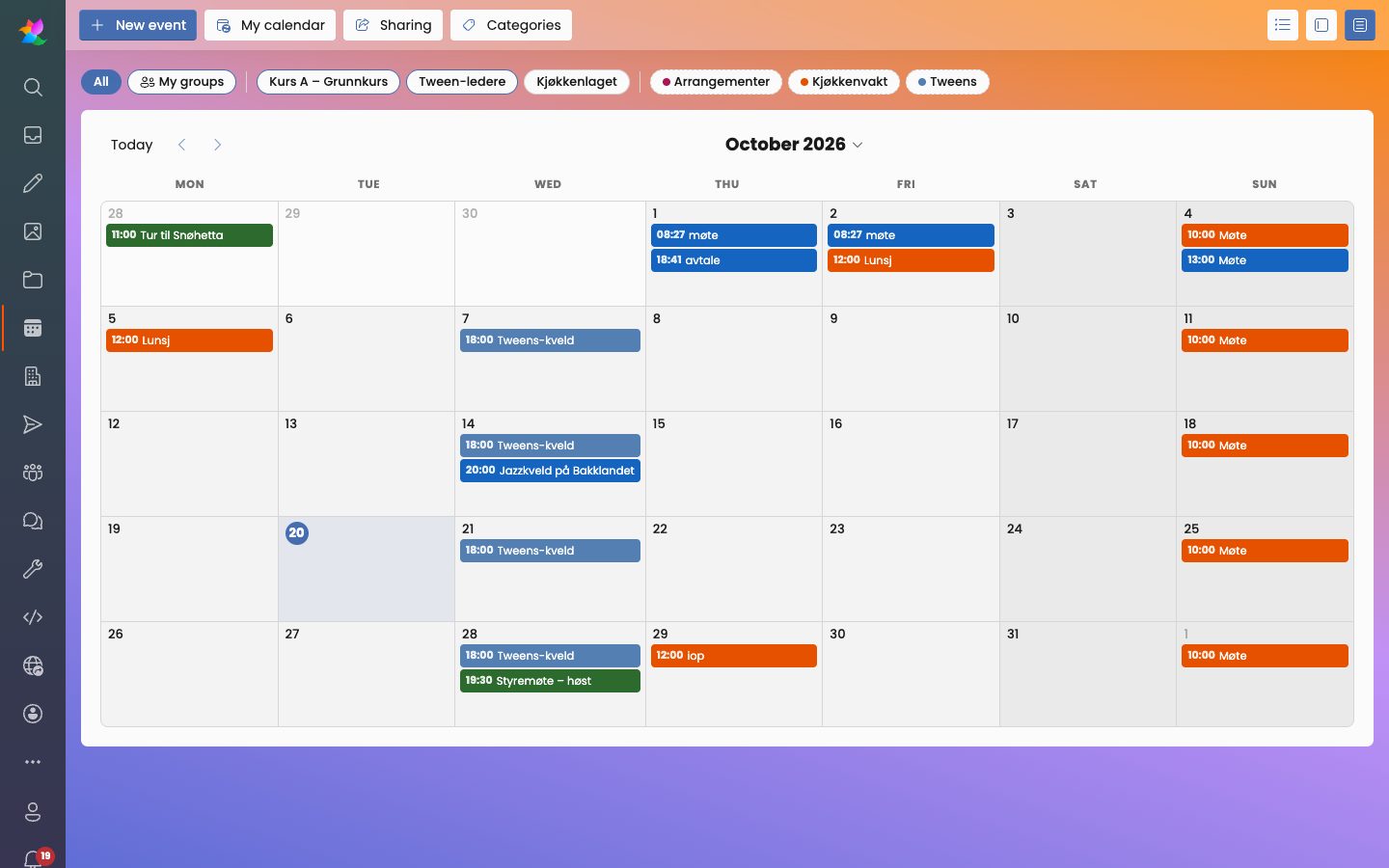
The calendar month view with color-coded events and group filters
Color-coded calendars with group filters, ready for busy organizations.
Sell more in your shop
  • Coupon links, promotions and promoter tracking, so you know which partner brought in the sale
  • Add-on products that customers can buy together with the main product
  • Professional order PDFs with your logo: invoice, receipt, packing slip and order details
  • A clearer variant layout with buttons, completed orders, and a smoother checkout with correct coupon totals and stock
People, podcasts and automation

Customers became contacts in a single, cleaner people register, group pages show roles and follow your preferred order, and editing people is simpler for non-technical admins. Podcasters get a sitewide audio player that keeps playing as visitors browse. And the automation dashboard was redesigned, so emails and reminders that send themselves are easy to set up and follow.
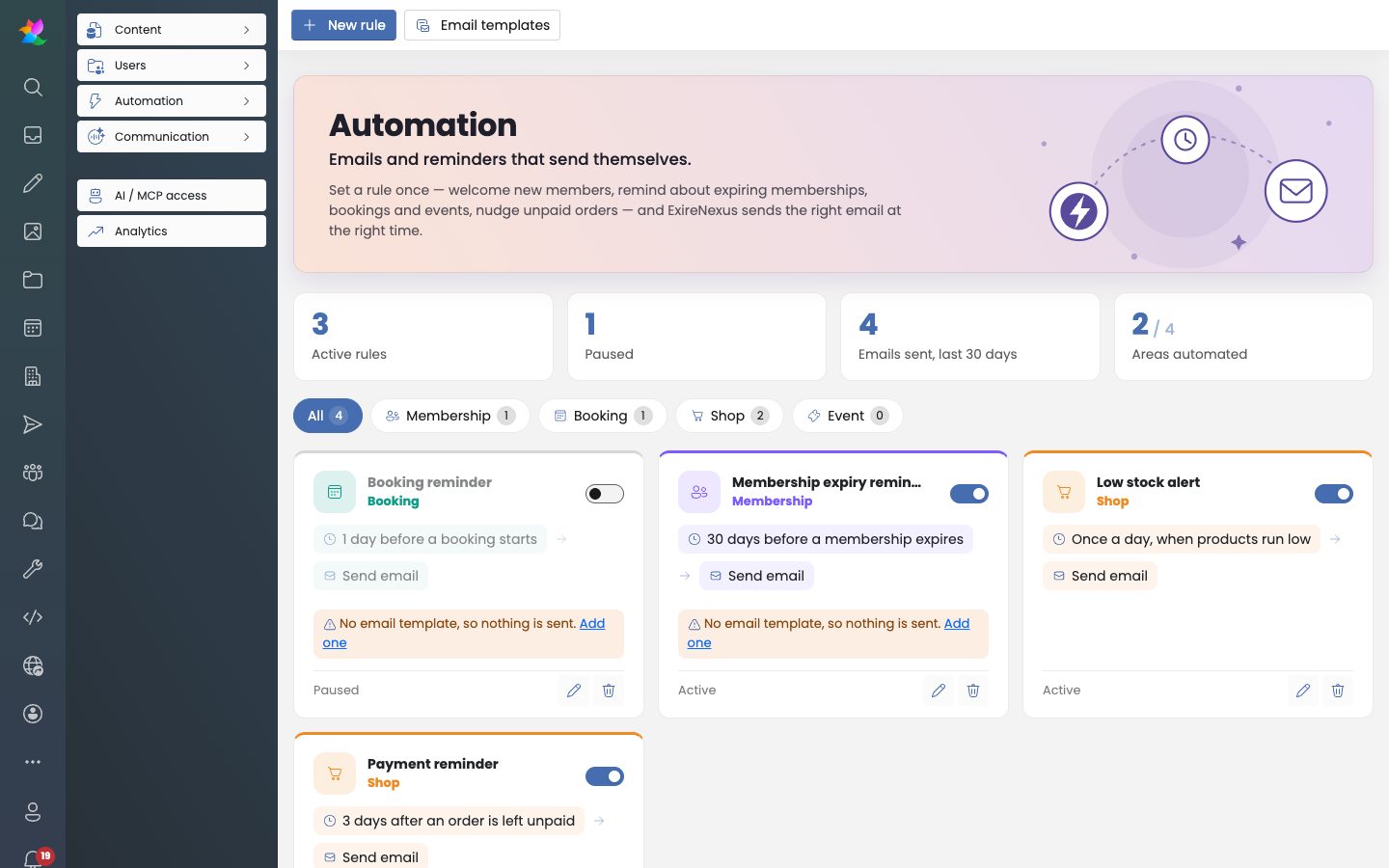
The automation dashboard with rules for bookings, memberships and the shop
Set a rule once, and the right email goes out at the right time.

Monthly summary

August 2026

Bringing people together. August introduced a people module, chat and a crew app, and made it far easier to get a brand new site up and running.

A home for your people

The new People module keeps members, staff and volunteers in one place, with photos, tag types and an organization tree. A new organization navigation block lets visitors browse your departments and find the right person by unit, right on your website.

Chat and a crew app

We launched chat, plus the first version of a crew app for your phone with posts, files and a feed where people can like and comment. Self sign-up got a friendlier look, so joining feels welcoming from the first tap.
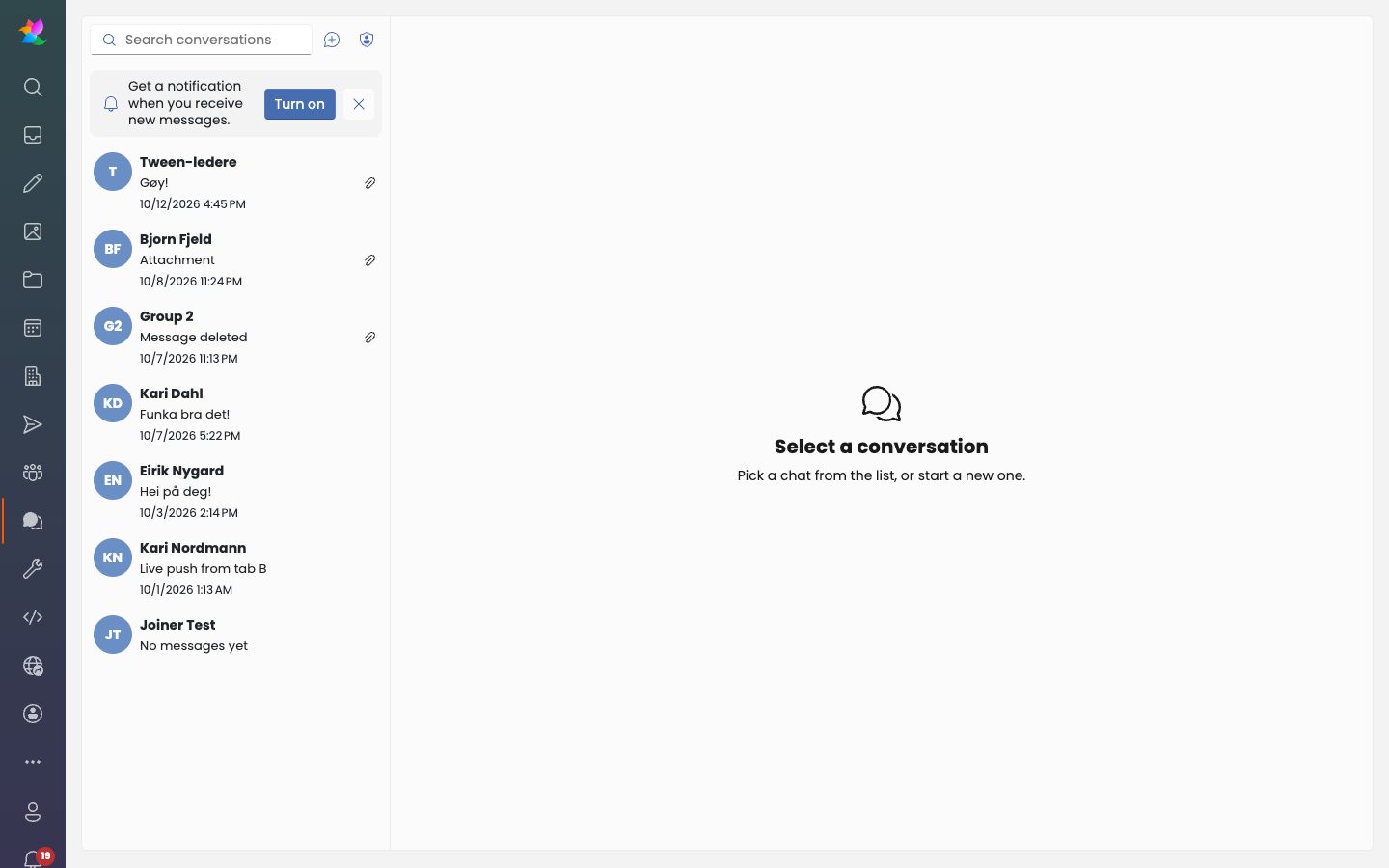
The chat with a list of group and direct conversations
Group and direct conversations, built right into eRedaktør.
Create content like in your favorite office app
  • A sleek, office-style dialog for new items, with templates (blueprints) offered every time
  • Video as a first-class media type, with previews and a video picker, plus muted background videos
  • A new swipeable block, backgrounds that stretch behind the header, and background overlays
  • A link picker and color picker in HTML blocks, and smarter, faster search
  • A custom 404 page, so even a wrong link looks like your brand
Your AI assistant learns the ropes

The AI assistant connection grew a lot: it can now manage menus, design settings, blocks, products and variants, event lists with countdowns and people, and it reads instructions you write for it.

Up and running in no time

A new site setup takes you from sign-up to a working site, with email confirmation, language settings and optional AI setup. Data processing agreements are now handled in the product, and new language versions of your content can be created with the translation feature. We also added calendar sharing, robot traffic analytics and time-of-day dashboard backgrounds that greet you good morning or good evening.

Monthly summary

July 2026

Payments, media and AI, all under one roof. July brought recurring payments, a digital asset manager and AI-powered search.

Recurring payments with Vipps

Memberships can now be paid with Vipps recurring payments: members agree once and renewals are charged automatically, with a preview before each charge. Stripe got updates too.

A Digital Asset Manager

The first version of the Digital Asset Manager gives your images and files a proper home, with metadata, categories and facets to find anything in seconds.

AI that understands your site

A new AI chat with smart search helps visitors find answers in your content, in Norwegian too. SEO descriptions can now be generated automatically, so every page is ready for search engines.

Email, login and privacy
  • Read email in your inbox through IMAP, send through your own SMTP server, and design a proper HTML signature
  • Sign in with Google
  • A GDPR-friendly cookie consent banner
Apps, scheduling and templates

All apps now live in one central place with a new app launcher and fresh icons. Event scheduling arrived, so you can plan who does what at each event, and blueprints let you save any item as a template for new content. Editors also got a personal edit mode with a handy side menu, images in button lists and smooth animations for images.

Monthly summary

June 2026

A brand new eRedaktør. At the end of May we moved to a completely new platform, bringing content and images over from the old eRedaktør. June was about making it a complete toolbox for selling, sharing and running your organization.
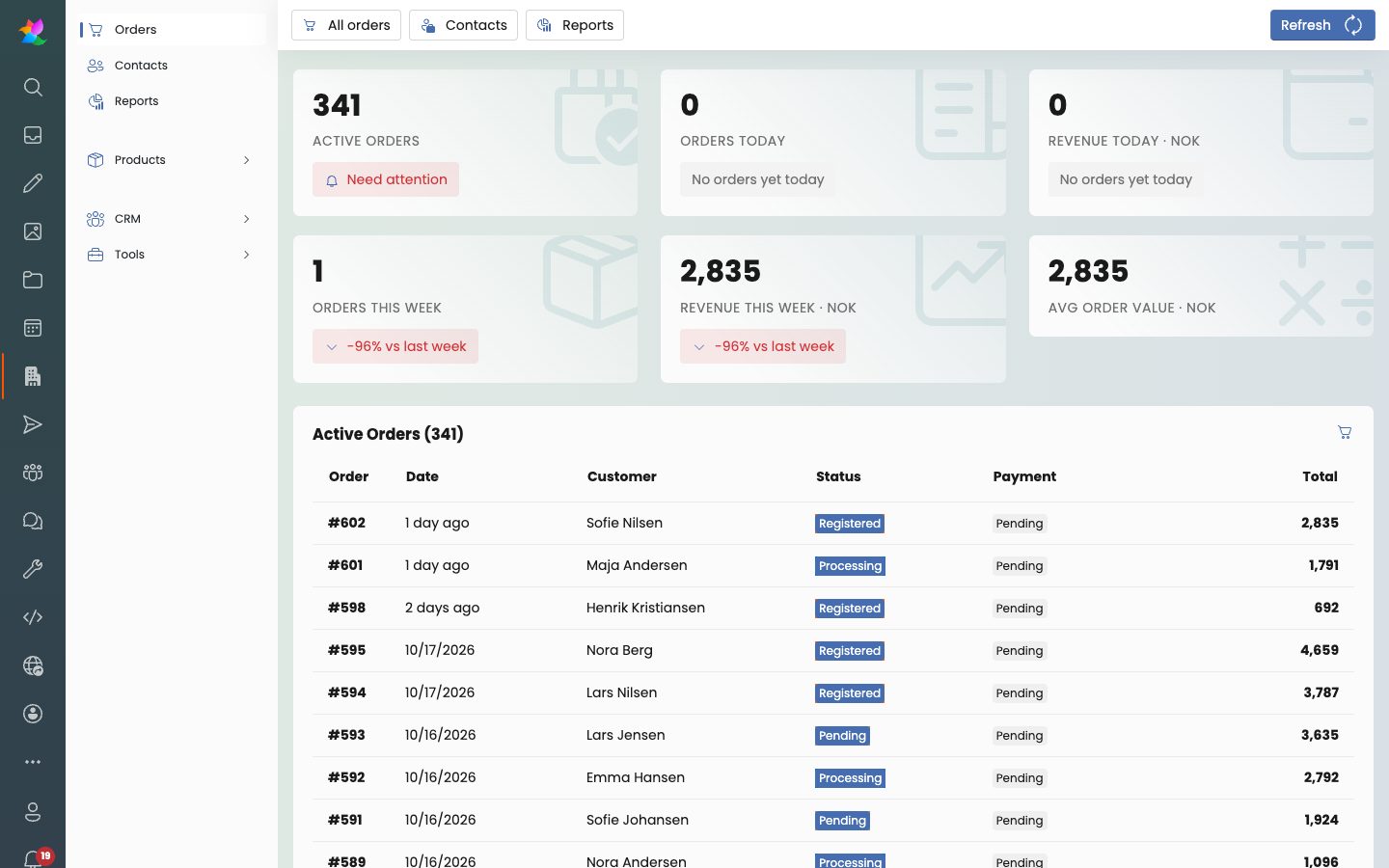
A full-featured online shop
  • Products with variants, prices and SKUs, a price editor with bulk editing, special prices and price labels
  • Product category pages with their own design, plus filters and sorting
  • Customer reviews, coupons in the basket, tax rates, freight products and a smoother checkout with Vipps as the default payment
  • Manufacturers with their own dashboard, and a basket count that updates in the site header
The shop dashboard with key numbers and a list of active orders
The shop dashboard puts orders and revenue front and center.
The first AI assistant connection

On June 8 we connected Claude to eRedaktør for the first time, using a secure sign-in. This was the start of everything you can do with AI on your site today.

Memberships and an intranet

Members got My page, a membership dashboard, payment registration and membership types. Pages can be limited to members or open to everyone, which makes eRedaktør a great intranet too.

A dashboard that feels like yours

The dashboard can be customized with your own gradient backgrounds, and a dedicated shop dashboard keeps sales in view.
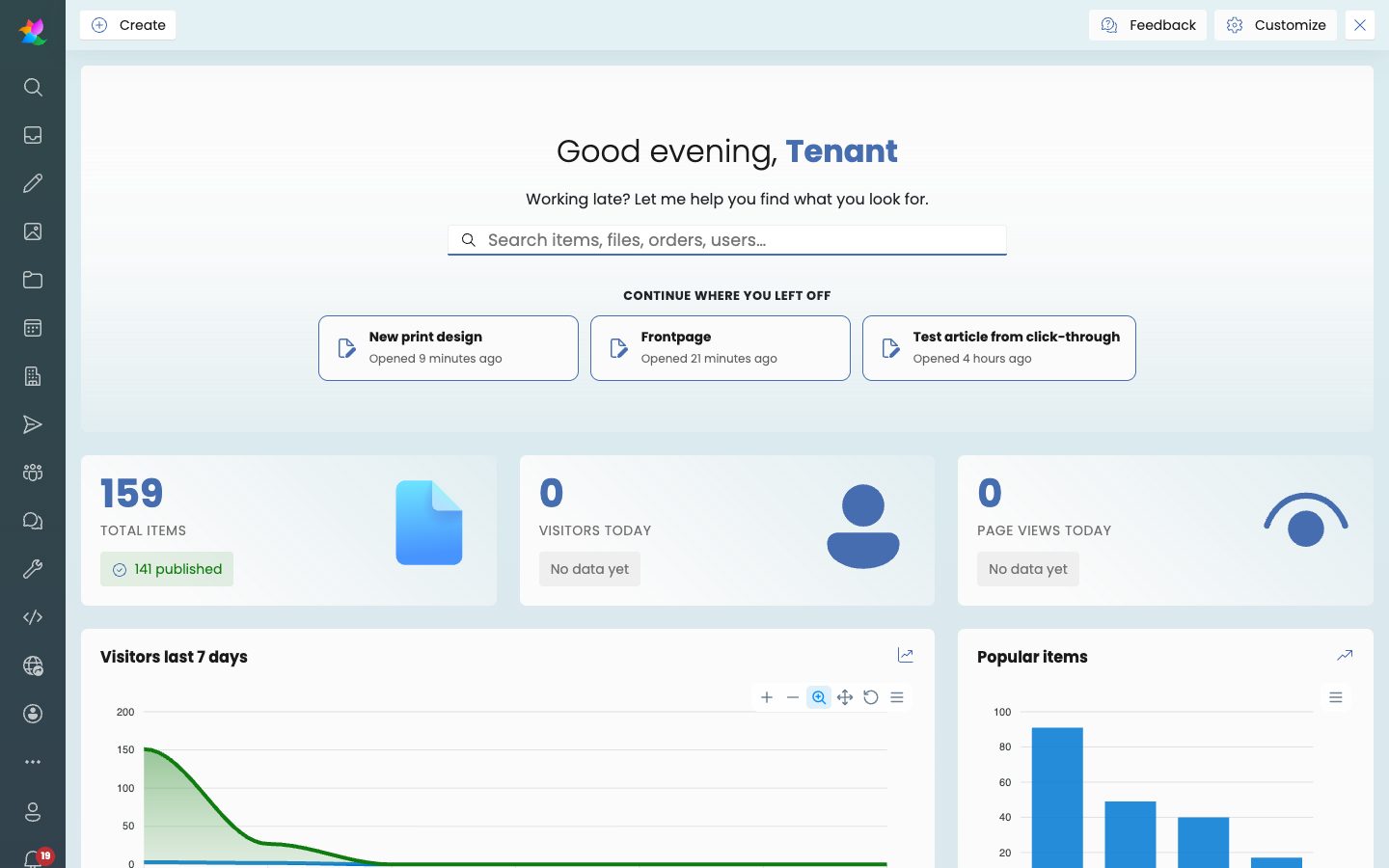
The dashboard with a greeting, search, recent items and key numbers
A friendly start page with search, recent work and the numbers that matter.
And so much more
  • Short links with QR codes and click counting, plus an automatic sitemap for search engines
  • An inbox that collects orders, comments and reviews in one place
  • Reliable email sending, automated emails with an HTML preview, and form responses by email
  • Delete, restore and purge files, duplicate items with or without their content, and a menu editor
  • Room booking with beds, check-in and check-out, and an organization builder
  • Web app (PWA) settings, a full-screen feed and an error log viewer

Rejoining the server...

Rejoin failed... trying again in seconds.

Failed to rejoin.
Please retry or reload the page.

The session has been paused by the server.

Failed to resume the session.
Please retry or reload the page.